
Users
Set a user ID on your traces to see what each of your users does and costs.
A user is an end user of your application. cetra builds the user list from the user IDs on your traces. See the data model.
Set a user ID
Section titled “Set a user ID”Use the same context block as for sessions. Every span started inside it carries the user ID.
import cetra
cetra.init()

@cetra.observe(name="turn")def turn() -> None: ...

with cetra.context(user_id="u-17", session_id="chat-42"):    turn()
cetra.flush()
import { observe, withContext } from "@cetra-ai/sdk";const turn = observe(({ question }: { question: string }) => `answered: ${question}`, { name: "turn",});withContext({ sessionId: "chat-42", userId: "u-17", tags: ["beta"] }, () => turn({ question: "why?" }),);Set the attribute cetra.user.id on a span. cetra also reads user.id and enduser.id, and the user attributes of the other conventions.
with tracer.start_as_current_span("turn") as span: span.set_attribute("cetra.user.id", "u-17")Use an ID that is stable for a person and that is not their email address or name. cetra shows the ID as you send it, and deletes data by it.
In the UI
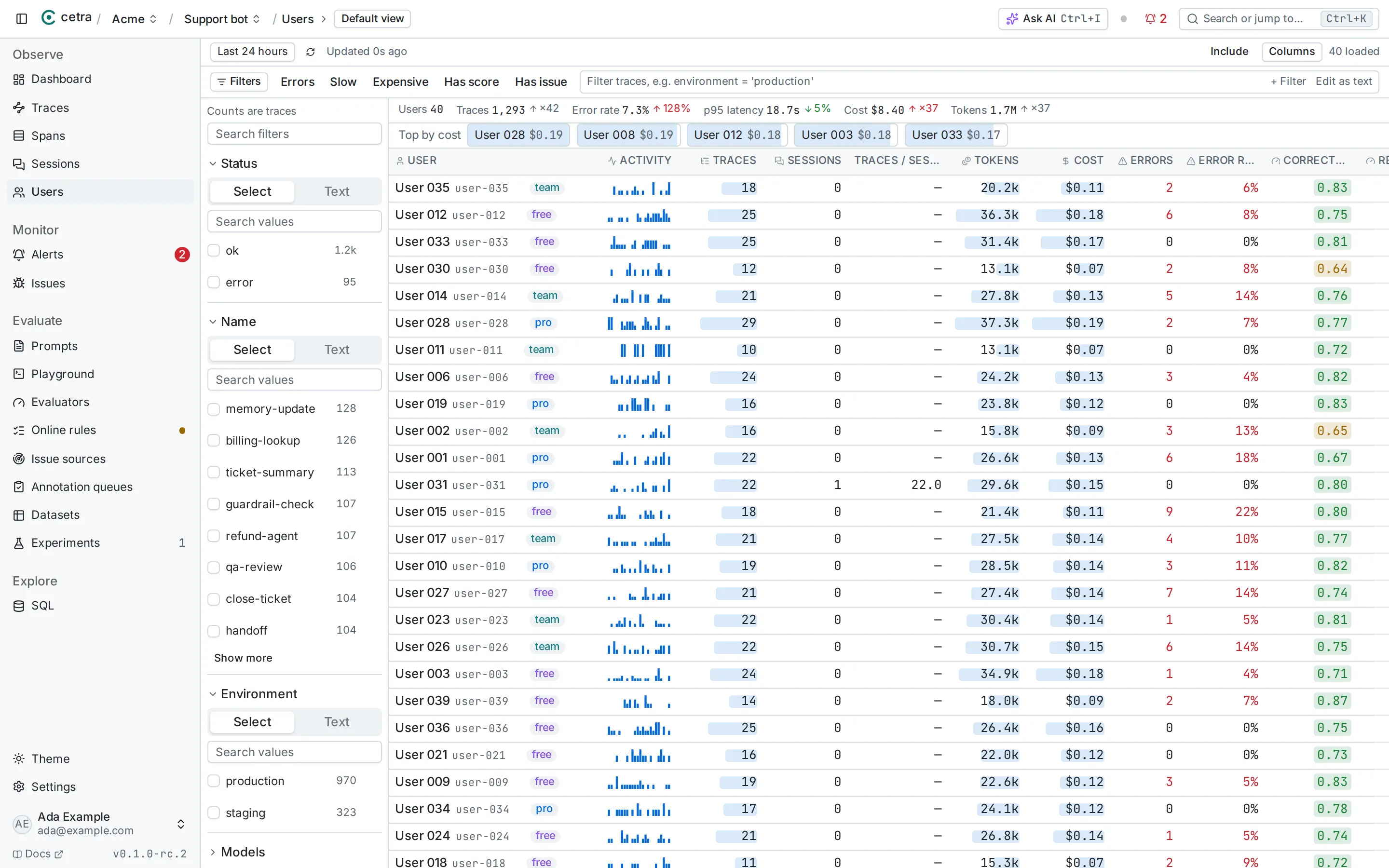
Section titled “In the UI”Select Users in the sidebar, or press g then u. A summary strip shows Traces, Error rate, p95 latency, Cost and Tokens for the users in the time range. Below it, Top by cost lists the users who cost the most. Select one to open that user.
The columns are:
- User: the user ID. If the user has a
user.namemetadata value, the name comes first and the ID after it. Auser.planvalue shows as a pill. - Activity: a small chart of traces over the time range.
- Traces, Sessions, Traces / session, Tokens and Cost.
- Errors and Error rate.
- One column per score name found in the users’ traces.
- Metadata, First seen and Last seen.
Select Columns to show, hide or reorder them. The list has facets, preset chips and saved views, as the traces list has. They work on the traces of the users (Filters and search). The name and plan come from trace metadata keys user.name and user.plan.
Select a row to open the user in a panel, with their metrics, activity, scores, metadata and recent sessions. Open page opens the user’s own page. It has a time range picker and three tabs:
- Overview: the user’s scores, metadata and usage charts.
- Sessions: the user’s sessions.
- Traces: the user’s traces.
An admin sees Delete user data… on the page.
Filter by user
Section titled “Filter by user”Filter the traces list with user_id = 'u-17'. In SQL, group by user_id to rank users by spend. See SQL console.
Limits
Section titled “Limits”- A trace takes its user from the root span, or from the first span that has one.
- An administrator can delete all the data of a user from the project settings (Deletion and retention).