
Evaluators and LLM judges
An evaluator is a saved recipe that reads a trace or a span and writes a score. Members of a project create and edit evaluators under Evaluators.
The evaluators list
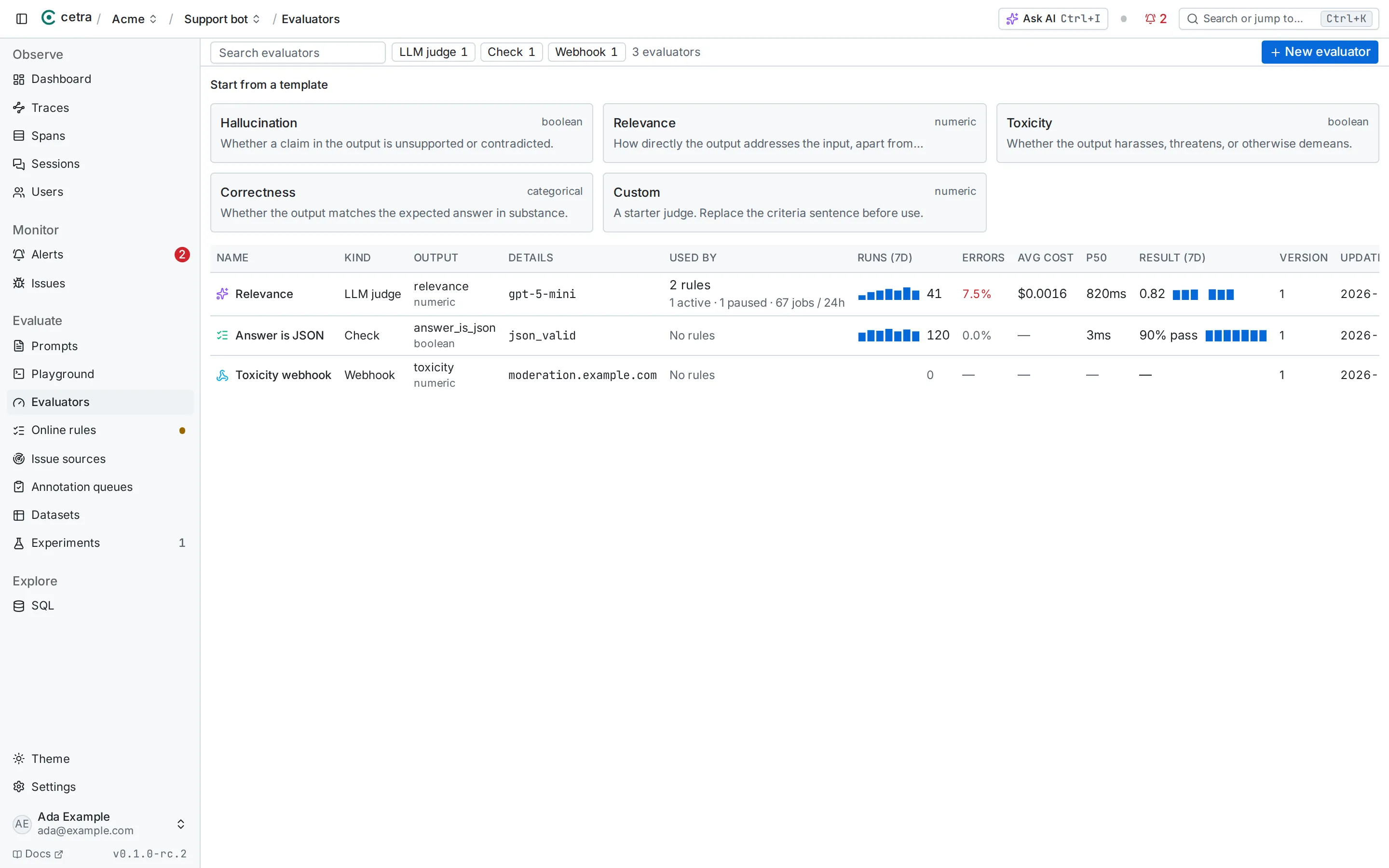
Section titled “The evaluators list”The list has a search box and Kind chips (LLM judge, Check, Webhook, each with a count; select a chip again to show every kind). Each row shows the name, kind, output, details, the rules that use the evaluator (Used by), the runs and errors of the last 7 days, the average cost, the p50 latency, the result of the last 7 days, the version and the update time. Select a row to open the evaluator.
An evaluator page has three tabs:
- Overview shows the last 7 days: runs (done, failed and skipped), error rate, judge cost, latency p50 and p95, and the result. Below are the online rules that use the evaluator, the score distribution, the recent jobs, and the experiments that have a score with the evaluator’s score name in the last 30 days. Its Create a rule button starts an online rule.
- Configuration is the form, with the Test section beside it, or below it in a narrow window.
- History lists every version, newest first. Select a version to see what changed from the one before: a line diff of the prompt and a Field, Before, After table for the other fields. A webhook’s URL, headers and secret are write-only, so changes to them do not show.
Kinds of evaluator
Section titled “Kinds of evaluator”Checks run inside cetra with no model call and no cost. They compare the output with an expected value or a pattern, and write a boolean or a number.
| Check | Score |
|---|---|
exact_match |
Boolean: the output equals the expected text (case-sensitive and trimmed by default). |
contains |
Boolean: the output contains a value, or any or all of a list. |
regex |
Boolean: the pattern matches anywhere in the output. |
json_valid |
Boolean: the output is valid JSON. |
json_schema |
Boolean: the output matches a JSON Schema; the reason is the first error. |
levenshtein |
Number from 0 to 1: how similar the output is to the expected text. |
LLM judges send a prompt to a model through an LLM connection and turn the answer into a score. The output is one of:
- a number in a range you choose;
- a boolean;
- a category from a list of labels, each with an optional numeric value.
With include reason on, the judge also explains its answer, and the explanation becomes the score’s reason.
Webhooks call a URL you run. cetra sends a signed JSON POST with the evaluator, the project, the trace and the variables. Your server answers with a JSON object holding value, label or reason, and cetra stores it as a score. The URL, the headers and the signing secret are stored encrypted and never shown again. cetra signs the body with HMAC-SHA256 and sends the result in an X-Cetra-Signature header, so you can check that a request comes from cetra. Redirects are not followed.
Variables and mapping
Section titled “Variables and mapping”A judge prompt, or a check that needs an input, uses variables written as {{ name }}. A mapping says where each variable comes from in the trace:
| Source | Meaning |
|---|---|
trace.input, trace.output |
The input and output of the root span of the trace. |
span.input, span.output |
The span the rule targets (span rules). |
span[name="retrieve"].output |
The first span with that name. |
span[kind="retriever"].output |
The first span of that kind. |
trace.metadata.<key>, span.metadata.<key>, span.attributes.<key> |
A metadata or attribute value. |
trace.transcript |
The whole trace as a compact text tree, for judging an agent’s steps. |
End an expression with a JSONPath to reach inside a value, for example trace.output$.answer, and add ? to make the variable optional. A missing required variable fails the evaluation with missing variable <name>, and a missing optional one renders as an empty string.
Messages render as one role: text line each. Other JSON renders compactly, and a template can index into it: {{ output.answer }}.
Experiments score in your own code, not with evaluators on the server, so evaluators cannot use expected or dataset item variables.
Templates
Section titled “Templates”On the evaluators list, the Start from a template gallery has one card per template. Select a card to open the new-evaluator form filled in from it. In the form, the Start from a template menu does the same and replaces the name, prompt and output. You can edit the prompt afterwards. The built-in templates are:
| Template | Variables | Output |
|---|---|---|
| Hallucination | input, output, context |
Boolean (true means hallucinated) |
| Relevance | input, output |
Number from 0 to 1 |
| Toxicity | output |
Boolean |
| Correctness | input, output, expected |
Category: correct, partially correct, incorrect |
| Custom | Your own | Your own |
The judge’s model and connection
Section titled “The judge’s model and connection”An LLM judge names a connection and a model. The model must exist at that provider, and the connection’s default model is used when you leave it empty. You can also set a maximum number of output tokens (default 1024), a timeout, and a temperature (unset by default).
Test a judge on a trace
Section titled “Test a judge on a trace”Before you use an evaluator in a rule, run it once on a stored trace.
- Open the evaluator and go to the Configuration tab. The Test section is beside the form, or below it in a narrow window.
- On the Trace tab, enter a Trace ID, and optionally a Span ID to target one span. Fill in the mapping. Or use the Variables tab and type literal values for the variables.
- Select Run test.
The test runs the form as it is, so unsaved changes are tested and nothing is saved. The result shows the value and the reason, token usage and latency, and expandable Prompt and Variables sections. A View judge trace link opens the judge’s trace. A test writes no score. You can run 10 tests or manual runs a minute.
To write a real score for one trace, use Run evaluator on the trace or on a selected span. The run is queued, and its score is stored like any other.
The judge’s own trace
Section titled “The judge’s own trace”Every time an evaluator runs, cetra records a trace of the run in your project, whether it succeeded or failed. For a judge the trace holds the full prompt, the answer, the token counts and the cost. Open it with View judge trace on the score.
These traces use the reserved environment cetra-eval. They do not count towards your application’s numbers: lists, user pages, the dashboard and alerts leave them out, and online rules never select them, so a judge never judges itself. Tick Evaluation traces in the Include menu of a list to see them. The dashboard shows their cost as a separate series. If an external OTLP sender uses the environment cetra-eval, cetra renames it to cetra-eval-external. Playground runs use the reserved environment cetra-playground in the same way: they are not billed, lists and the other views leave them out, and an external sender’s cetra-playground is renamed to cetra-playground-external.
What judges cost
Section titled “What judges cost”A judge call costs what your provider charges, and cetra shows the cost on the judge’s trace and on the score. Checks cost nothing. Judge calls count towards the organization’s usage for the month; when the monthly cap is reached, evaluations are skipped. To limit what a rule can spend, set a budget on it.