
Prompts
A prompt is a named, versioned template in the project’s registry. Your code fetches a version by label, fills its variables, and links the spans it writes to the version that ran.
Versions and labels
Section titled “Versions and labels”A prompt is a text template, a single string, or a chat template, a list of 1 to 200 messages. A message has a role (system, user or assistant) and content. A chat template can also hold a placeholder, which stands for a list of messages that you pass in when you compile it.
- A version is immutable. The first save makes version 1, and each later save makes the next number.
- A label is a name that points at one version, such as
productionorstaging. Moving a label changes what a fetch by that label returns. It does not change any version. - A label is lowercase letters, digits,
_,.or-, up to 64 characters. It is never only digits and neverlatest.latestalways means the highest version and is not stored. A prompt has at most 50 labels. - The default label for a fetch is
production. - Protected labels cannot be moved by an ordinary member. By default
productionis protected. A project admin, or an API key with thewritescope, moves a protected label. Other requests get403 forbidden.
A template is at most 256 KiB. A version can have a commit message of up to 500 characters and a config, which is a JSON object of up to 64 KiB that cetra stores as you send it.
In the UI
Section titled “In the UI”The Prompts page in the Evaluate group lists the project’s prompts. Search by name, filter by label or tag, and select New prompt to create one. Members and above create prompts and move labels. Labels that a project admin protects, production by default, can be moved by admins only; the other users see them with a lock. Admins also open Protected labels to change the list.
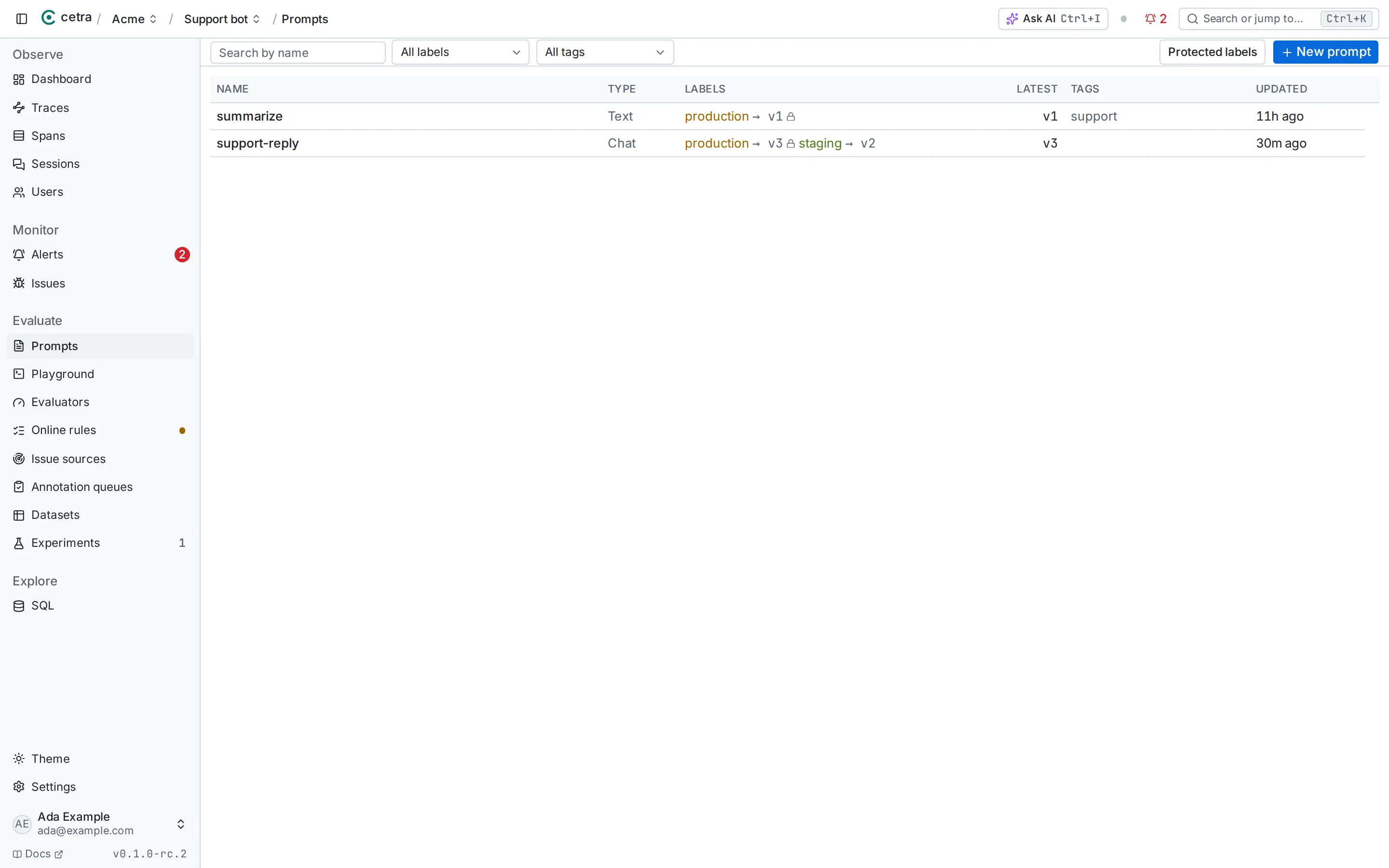
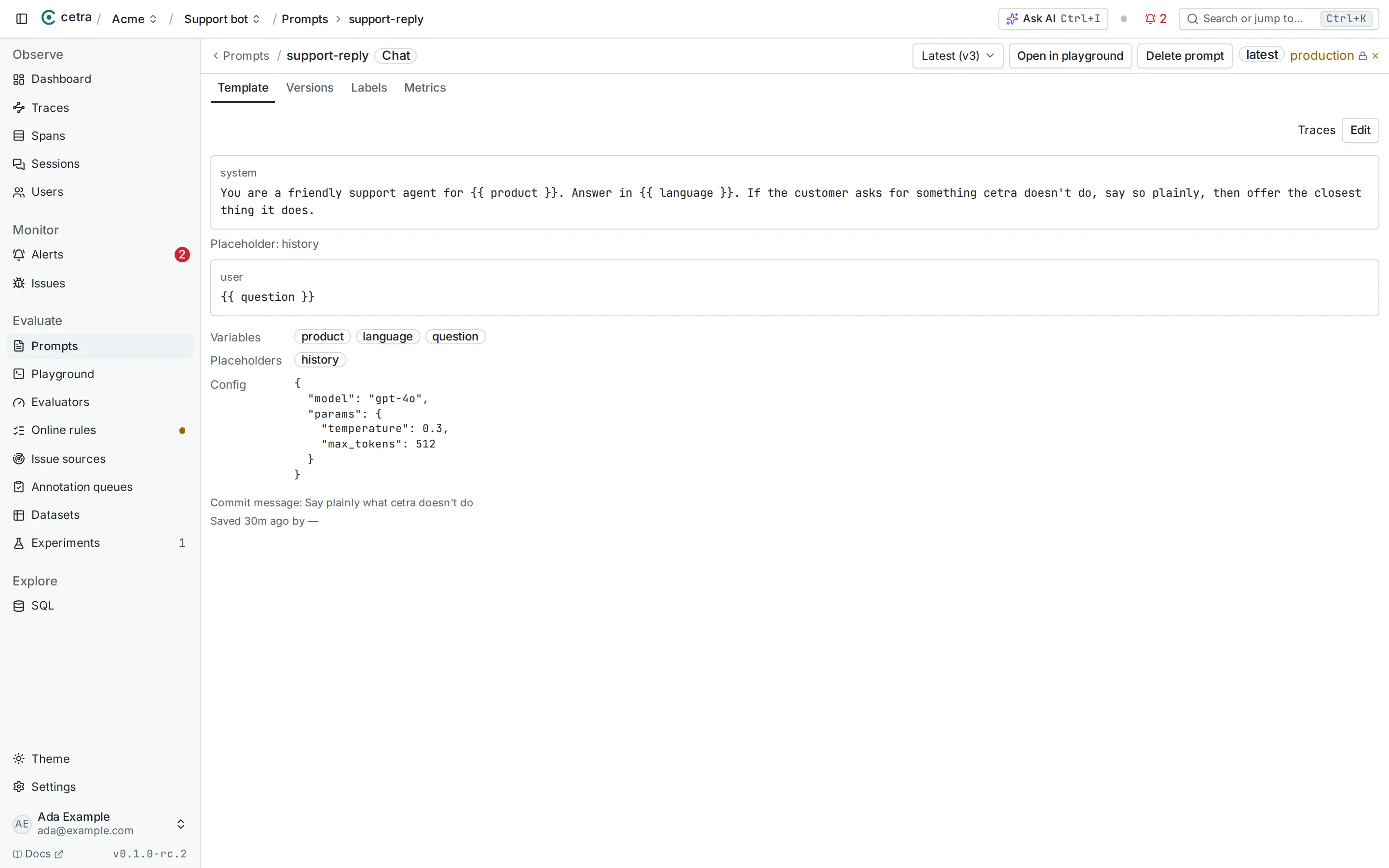
Select a prompt to open its page. The Template tab shows the version you choose, and members edit it there: Save as new version writes the next version, with a commit message. The Versions tab lists every version with its labels. Use Set label… on a row to move a label to that version, and the remove button on a chip to take it off. A version’s diff compares it with the version before it, line by line. The Labels tab shows the history of every label move. The Metrics tab compares the versions over the last 24 hours, 7 days or 30 days, with their spans, errors, cost, latency and scores; each version links to its traces. To run a version against one to four models, select Open in playground on the prompt page. See the playground.
Template syntax
Section titled “Template syntax”A variable is {{ name }}. A name is a letter or an underscore, followed by letters, digits or underscores. Reserved words such as true, none and loop cannot be names.
A placeholder is an entry of a chat template with type set to placeholder and a name:
[ { "role": "system", "content": "You answer questions about {{ product }}." }, { "type": "placeholder", "name": "history" }, { "role": "user", "content": "{{ question }}" }]Fetch a prompt
Section titled “Fetch a prompt”Call get_prompt in Python or getPrompt in TypeScript after you call init(). The key and the server URL come from the environment, as for the rest of the SDK.
import cetra
cetra.init()  # the key and URL come from the environment
prompt = cetra.get_prompt("support-bot")  # the production labelstaging = cetra.get_prompt("support-bot", label="staging")pinned = cetra.get_prompt("support-bot", version=3)
import { getPrompt, init } from "@cetra-ai/sdk";
init(); // the key and URL come from the environment
const prompt = await getPrompt("support-bot"); // the production labelconst staging = await getPrompt("support-bot", { label: "staging" });const pinned = await getPrompt("support-bot", { version: 3 });The options are:
| Option | Python | TypeScript | Default | Meaning |
|---|---|---|---|---|
| Label | label |
label |
production |
The version the label points at. Pass a label or a version, not both. |
| Version | version |
version |
none | A version number, from 1. It never expires in the cache. |
| Fallback | fallback |
fallback |
none | A text template, or a list of {role, content} messages, used when no prompt can be fetched. |
| Cache time | cache_ttl_s |
cacheTtlS |
60 seconds |
How long a label stays fresh. 0 turns the label cache off. |
A fallback is not a registry version. Its version is None in Python and undefined in TypeScript, and its flag is is_fallback in Python or isFallback in TypeScript, set to true.
Compile the prompt
Section titled “Compile the prompt”compile fills the variables and the placeholders. A text prompt gives a string. A chat prompt gives a list of messages that you pass to your model client.
import cetra
cetra.init()
prompt = cetra.get_prompt("support-bot")messages = prompt.compile(    product="cetra",    history=[        {"role": "user", "content": "Hi"},        {"role": "assistant", "content": "Hello. What do you need?"},    ],    question="How do I rotate a key?",)
import { getPrompt, init } from "@cetra-ai/sdk";
init();
const prompt = await getPrompt("support-bot");const messages = prompt.compile({ product: "cetra", history: [ { role: "user", content: "Hi" }, { role: "assistant", content: "Hello. What do you need?" }, ], question: "How do I rotate a key?",});The values are:
- strings, numbers and booleans for variables. A boolean renders as
trueorfalse. A whole number given as a float renders without a fraction, so1.0renders as1, up to 2^53 in size. Other numbers use the language’s own shortest form, so a large or fractional number can read differently in each SDK. - a list of
{role, content}messages for each placeholder. An empty list is allowed.
Any other value, and a NaN or an infinite number, raises TypeError in both SDKs. A missing variable or placeholder raises PromptCompileError. The error names the prompt and the missing name, never the template text or the values. In Python it is a ValueError.
compile also writes cetra.prompt.name and cetra.prompt.version on the current span, if that span is recording.
Link spans to a prompt
Section titled “Link spans to a prompt”Compile the prompt inside the code that calls the model. To link every span started in the block, pass the prompt to context in Python or to withContext in TypeScript.
import cetra
cetra.init()
prompt = cetra.get_prompt("support-bot")with cetra.context(prompt=prompt):    messages = prompt.compile(product="cetra", history=[], question="How do I rotate a key?")    # call your model with messages; its spans carry the prompt link
import { getPrompt, init, withContext } from "@cetra-ai/sdk";
init();
const prompt = await getPrompt("support-bot");await withContext({ prompt }, async () => { const messages = prompt.compile({ product: "cetra", history: [], question: "How do I rotate a key?" }); // call your model with messages; its spans carry the prompt link});Every span started in the block carries cetra.prompt.name. A span also carries cetra.prompt.version when the prompt is a registry version. A fallback writes the name only. A nested block with no prompt keeps the outer one, and an inner prompt replaces it.
Find traces by prompt version
Section titled “Find traces by prompt version”A linked span carries prompt_name and prompt_version. Its trace carries prompts, the list of name@version pairs of its spans. Filter the trace list with prompts @> ['support-reply@2'] to find the traces that used version 2 of support-reply.
To compare versions, ask for the metrics of one prompt. The answer has one entry per version: span and trace counts, errors, cost, latency percentiles, token averages and the mean of each numeric or boolean score. from and to bound the window (the last 7 days by default), and versions takes a comma-separated list:
curl -H "Authorization: Bearer <API_KEY>" \ "http://localhost:8080/api/v1/projects/current/prompts/support-reply/metrics?versions=1,2"Caching and fallback
Section titled “Caching and fallback”The SDK keeps prompts in the process, so a call does not wait on the server each time.
- A version never expires, because a version never changes.
- A label is fresh for 60 seconds. After that, the stale prompt is returned at once, and one background refresh runs for that key. Calls made during the refresh get the stale prompt.
- The first fetch of a key waits for the server. Each attempt has a timeout of 5 seconds. Network errors,
429and5xxanswers are retried twice. ARetry-Afterheader is honored, up to 5 seconds. - If a refresh fails, the stale prompt stays in use, and its 60-second age starts again, so the server is asked again only after another full interval. The SDK logs one warning a minute, with the prompt name and the status only. With
cache_ttl_sset to0, a failed fetch of a cached label still returns the cached prompt. - If the first fetch fails, the call returns the fallback. Without a fallback it raises
PromptNotAvailable. - The cache keeps up to 1,000 entries. The least recently used entry is dropped first.
PromptNotAvailable has a reason and the prompt’s name: name in Python, prompt in TypeScript (Error.name is the class name there). The reason is one of not found, status <code>, network, invalid response or sdk disabled.
Before init(), or when no API key is set, get_prompt and getPrompt act as a failed fetch. They return the fallback or raise PromptNotAvailable with the reason sdk disabled.
Give a fallback that your application can run on, so that a server outage does not stop it:
import cetra
cetra.init()
prompt = cetra.get_prompt(    "summarize",    fallback="Summarize this for {{ audience }}: {{ text }}",)text = prompt.compile(audience="a new user", text="cetra stores spans in Parquet.")
import { getPrompt, init } from "@cetra-ai/sdk";
init();
const prompt = await getPrompt("summarize", { fallback: "Summarize this for {{ audience }}: {{ text }}",});const text = prompt.compile({ audience: "a new user", text: "cetra stores spans in Parquet." });Fetch over REST
Section titled “Fetch over REST”The REST API answers the same lookup, for scripts and other languages. The key needs the read scope.
curl -i -H "Authorization: Bearer <API_KEY>" \ "http://localhost:8080/api/v1/projects/current/prompts/support-bot/resolve?label=production"The answer is the resolved version: its name, type, version, template, config, labels, variables, placeholders, commit_message and created_at. Its ETag header identifies the body. To check whether a copy is current, send the tag back in If-None-Match. The server answers 304 Not Modified with no body when nothing changed:
curl -i -H "Authorization: Bearer <API_KEY>" -H 'If-None-Match: "<ETAG>"' \ "http://localhost:8080/api/v1/projects/current/prompts/support-bot/resolve?label=production"Use version=<N> in place of label= to fetch a version.
Manage prompts from scripts
Section titled “Manage prompts from scripts”client.prompts in each SDK reads and writes prompts for scripts and CI. It is not cached. Its calls raise ApiError on an error answer. It has get, list, create, create_version (createVersion in TypeScript) and set_label (setLabel). Writes need a key with the write scope and are sent once. See the Python reference and the TypeScript reference.