
Experiments
An experiment runs your task on every item of a dataset, scores each result and stores everything in cetra, so you can compare a change against the version you have today.
The experiment runs in your process, so your code, your credentials and your scorers stay with you. cetra stores the results and does not run scorers for experiments.
Run an experiment
Section titled “Run an experiment”evaluate needs the SDK initialized first, and a key with the ingest, read and write scopes. Each scorer receives what it asks for: the item’s input, your task’s output, the expected output, the item’s metadata and the trace ID.
import cetra
cetra.init()  # the key comes from CETRA_API_KEY

def task(input: dict) -> str:  # receives item.input; may also take (input, item)    return my_app.answer(input["q"])

def exact(output: str, expected: dict) -> bool:  # scorers take any of the names below    return output.strip() == expected["a"].strip()

def length_ok(output: str) -> cetra.Score:  # a Score carries a reason    return cetra.Score(value=len(output) < 500, reason=f"{len(output)} chars")

result = cetra.evaluate(    dataset="faq-v1",    task=task,    scorers=[exact, length_ok],    experiment_name="gpt-5-mini prompt v3",    metadata={"model": "gpt-5-mini", "prompt": "v3"},    concurrency=8,    repetitions=1,)print(result.summary())result.assert_min("exact", 0.8)  # raises AssertionError when the mean is below 0.8
For an async task, use await cetra.aevaluate(...). evaluate refuses a coroutine function.
import { evaluate, init, type Score } from "@cetra-ai/sdk";
init(); // the key comes from CETRA_API_KEY
function exact({ output, expected }: { output: unknown; expected: unknown }): boolean {  return String(output).trim() === (expected as { a: string }).a.trim();}
function lengthOk({ output }: { output: unknown }): Score {  const text = String(output);  return { value: text.length < 500, reason: `${text.length} chars` };}
const result = await evaluate({  dataset: "faq-v1",  task: (input) => myApp.answer((input as { q: string }).q),  scorers: [exact, lengthOk],  experimentName: "gpt-5-mini prompt v3",  metadata: { model: "gpt-5-mini", prompt: "v3" },  concurrency: 8,  repetitions: 1,});console.log(result.summary());result.assertMin("exact", 0.8); // throws when the mean is below 0.8
The options:
- Dataset. A name, an ID or a dataset object. It runs at the version the object holds, or the latest one. Pin another with
dataset_version(datasetVersionin TypeScript). - Task. Python calls
task(input), ortask(input, item)when it takes two parameters. TypeScript callstask(input, item), and the task may return a promise. - Scorers. A scorer’s name is its function’s name, so use named functions. Lambdas, anonymous functions and duplicate names are refused before anything runs. In Python the parameters are picked by name from
input,output,expected,metadata,trace_idanditem. In TypeScript a scorer receives one object with the same fields (traceIdfor the trace). - Scorer results. A boolean, a number or a string gives a boolean, numeric or categorical score. A
Scoreadds a reason and metadata.Noneorundefinedmeans no score. - Concurrency and repetitions.
concurrencyruns 1 to 64 items at once (default 8).repetitionsruns each item 1 to 20 times (default 1). - Name.
experiment_name(experimentName) is 1 to 200 characters. By default it is the dataset name and the UTC time.
summary() returns the run and error counts and, for each scorer, the mean of numeric and boolean values or the count of each label. It also prints the experiment ID.
What gets recorded
Section titled “What gets recorded”- One trace per run. Its root span is named after the experiment and holds the item’s input and your task’s output. Every span the task starts, from your code or from an instrumentation library, carries the experiment ID and the dataset item ID, with the environment
experiment. The default trace lists leave experiment traces out. Open the Include menu and tick Experiment traces to see them. - The scores. They are attached to the run’s trace. If tracing is sampled below 100%, a run can have no trace, and its scores stay in the local result only.
- The experiment row. For every item and repetition: the input, the expected output, the output, the error, the trace and the latency. A very large output is cut and marked as truncated.
Items multiplied by repetitions can be at most 20,000.
When something fails
Section titled “When something fails”A task that raises an error ends that run with the error, which is stored on the run, and the experiment goes on. A scorer that raises gives that run no score for it. Both are counted in the summary.
If uploading results fails, evaluate stops, marks the experiment as failed and raises the error.
Read the results
Section titled “Read the results”Open Experiments in the UI.
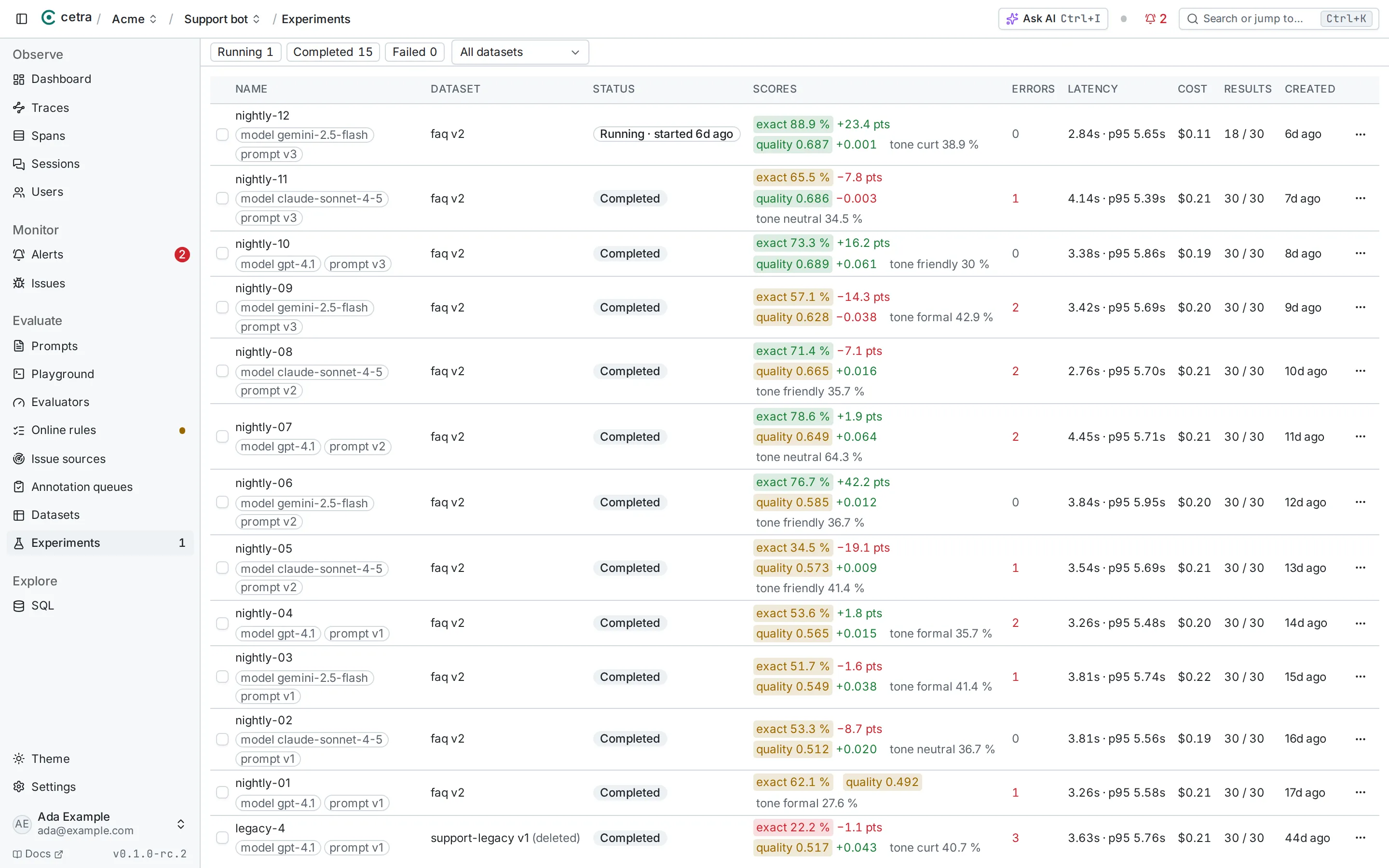
The list has status chips (Running, Completed, Failed, each with a count; select a chip again to show every run) and a Dataset filter. When you filter on one dataset with at least two runs, a Trend chart shows its runs over time. Each row shows the name and metadata tags, the dataset and version, the status, a badge for each score with its change since the previous run of the same dataset, the error count, latency, cost, the number of results out of the expected total, and the creation time. Select a row to open the experiment in a panel beside the list. The layout switcher in the panel header sets the panel to the drawer, the bottom or the full page.
The experiment panel shows:
- the dataset and version, the status, the creation and finish times, and Compare with previous run when the dataset has an earlier run;
- summary cards: results, errors, latency, cost, and one per score with its distribution;
- a table with each item’s input, expected output, output, error, scores, latency, cost and a link to its trace, and an Errors only switch.
Select a row of the table to open that item in a side sheet. It shows the repetition, latency, cost, the input, expected output and output, and the scores. Pretty and JSON switch how a value is shown, and Open trace goes to its trace. The up and down arrows step to the other items.
Compare experiments
Section titled “Compare experiments”Tick 2 to 4 experiments in the list. The first one you tick is the baseline. A bar shows its name and a Compare button. The compare view shows each score with its change from the baseline, and per-item outputs with a word-level difference. Select an item to see all the runs of it in a side sheet. It warns when the experiments ran on different dataset versions.
Two controls in the header set what counts as a change:
- Threshold is a number from 0 to 1000, 0.1 by default. A score that drops by more than the threshold, or a new error, is a regression. A score that rises by more than it, or a fixed error, is an improvement.
- Show filters the items: All, Regressed, Improved or Changed.
Run it in CI
Section titled “Run it in CI”assert_min (assertMin) fails when a scorer’s mean is below a threshold, or when the scorer produced no values. A failed assertion raises an error, so the CI step fails.
import sys
import cetra
cetra.init()result = cetra.evaluate(dataset="faq-v1", task=task, scorers=[exact])print(result.summary())if result.error_count:    sys.exit("some runs failed")result.assert_min("exact", 0.8)
import { evaluate, init } from "@cetra-ai/sdk";
init();const result = await evaluate({ dataset: "faq-v1", task, scorers: [exact] });console.log(result.summary());if (result.errorCount > 0) { process.exit(1);}result.assertMin("exact", 0.8);The task and exact functions are the ones from the first example. Run the script from your CI job with CETRA_API_KEY and CETRA_BASE_URL set.
Errors from the SDK
Section titled “Errors from the SDK”ConfigError means there is no API key, or you called evaluate before init(). A bad argument raises ValueError (TypeError in TypeScript) and sends nothing. An error answer from the server raises ApiError with status, code, detail and errors. A key without the needed scope gets a 403.