
Sessions
Set a session ID on your traces to see them together, in order, with their total cost and errors.
A session is the set of traces that share a session ID: for example the turns of one chat. You do not create a session. cetra builds it from the ID. See the data model.
Set a session ID
Section titled “Set a session ID”Wrap the code that handles one turn in a context block. Every span started inside the block carries the session ID, so each trace of the session carries it too.
import cetra
cetra.init()

@cetra.observe(name="turn")def turn() -> None: ...

with cetra.context(session_id="chat-42", user_id="u-17"):    turn()
cetra.flush()
import { observe, withContext } from "@cetra-ai/sdk";const turn = observe(({ question }: { question: string }) => `answered: ${question}`, { name: "turn",});withContext({ sessionId: "chat-42", userId: "u-17", tags: ["beta"] }, () => turn({ question: "why?" }),);Set the attribute cetra.session.id on a span. cetra also reads session.id and gen_ai.conversation.id, and the session attributes of the other conventions.
with tracer.start_as_current_span("turn") as span: span.set_attribute("cetra.session.id", "chat-42")Use the same ID for every trace of the session. A new ID starts a new session.
In the UI
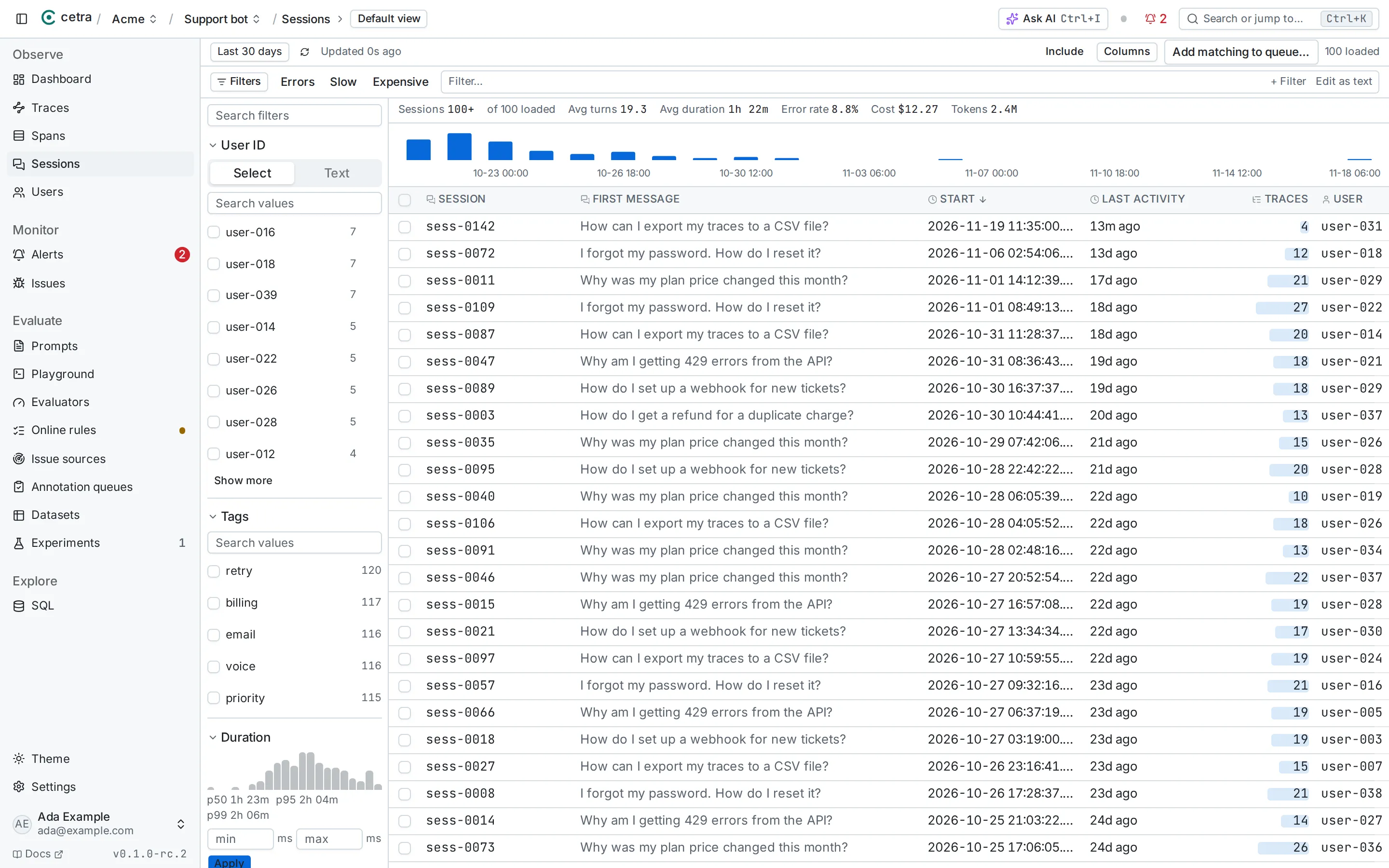
Section titled “In the UI”Select Sessions in the sidebar, or press g then s. A chart above the list counts the sessions that started in each part of the time range. A summary strip shows the totals for the loaded sessions: Sessions, Avg turns, Avg duration, Error rate, Cost and Tokens. If more sessions exist than are loaded, it says “of N loaded”.
The columns are:
- Session, the session ID.
- First message and Last answer, a preview of the first input and the last output.
- Start and Last activity.
- Traces, Duration, Tokens and Cost.
- User and Tags.
- Errors and Error rate.
- One column per score name found in the sessions.
Select Columns to show, hide or reorder them. The list has the same facets, preset chips (Errors, Slow, Expensive) and saved views as the traces list (Filters and search).
Open a session to read it as a transcript. cetra rebuilds the conversation from the input and output of each trace’s root span, in order. Select a turn to open its trace. Session scores sit at the top, and Annotate adds your own.
Each turn shows the calls made in it, and the page helps you search and move through the turns:
- Tool, retriever and guardrail calls appear as chips under the turn. A failed call is red and shows its error message.
- Select the chevron beside a turn to list its model, tool, retriever and guardrail calls in order, each with one line of its input preview. Select a call to open it in the trace.
- Search the turns by name or text, and filter them with the Failed, Scored and Uses tools chips.
- Switch to Compact to show one line per turn.
- The strip above the transcript shows one cell per turn, sized by duration and colored by status. Select a cell to jump to its turn.
- Press
jandk, or the arrow keys, to move between turns. The errors chip in the header selects the next failed turn, then starts again from the first.
A session takes its user from the first trace that has one, and its tags are the tags of all its traces together.
Filter sessions
Section titled “Filter sessions”Use the filter bar with the sessions view: for example trace_count > 10 AND cost_total > 1. To list the traces of one session, filter the traces list with session_id = 'chat-42'. See Filters and search.
Limits
Section titled “Limits”- A trace belongs to one session. If its spans carry different session IDs, cetra prefers the root span’s.
- Session cost and tokens add up the traces cetra has received so far.